Download
Get TypeCount for Windows
A private keystroke counter for Windows 10 and 11. It counts how many keys you press, never which ones.
Download from the Microsoft Store
Free for 30 days. Then US$0.99 once. Nothing you type leaves your PC.
Windows 10 (version 1809 or later) or Windows 11, 64-bit
What you get
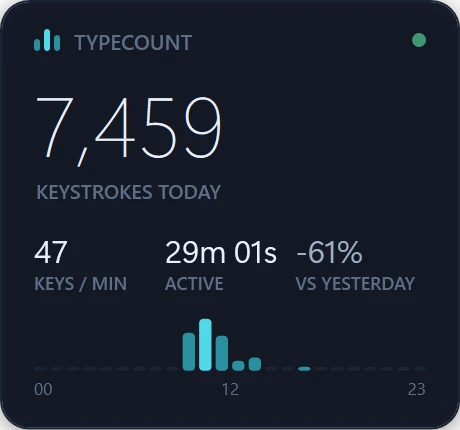
- A small widgetwith today's keystrokes, your pace and your active time.
- A dashboard of your hours, days and sessions, with a six-month calendar of your typing.
- Nothing you type is kept. It adds one to a number and forgets the key. No account, no cloud, no network connections. See exactly what it stores.
How do I install TypeCount?
- Press Download from the Microsoft Store on this page. The Microsoft Store opens on TypeCount.
- Choose Free trial. Everything is included for 30 days. You can buy it once, any day, from the dashboard or the Store.
- Open TypeCount. The widget appears and starts counting; the dashboard is one click away in the tray.
Not sure yet? Try the free online keystroke counter in your browser first, or read support.
Count your keys, not your words.

Free for 30 days with everything included, then US$0.99 once (₹74 in India). No subscription.
Windows 10 (version 1809 or later) or Windows 11, 64-bit
Counts how many keys, never which. No account, no cloud, no network connections.